
SAGE ORACLE TOUCH REPAIR SPECIALISTS
Expert Sage Oracle Touch repairs and servicing
Whether your Oracle Touch is stuck heating, showing an Operation Error or ER code, has a grinder or automatic tamping fault, or has developed a steam or water-system problem, our engineers can diagnose the fault and help you take the right next step.
★★★★★ 4.9 rating
100-day warranty
99% repair success
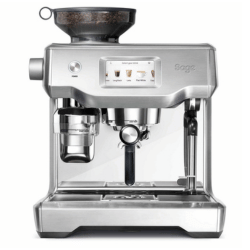
Is this your machine? The Sage Oracle Touch combines an integrated grinder and automatic tamping system with a touchscreen interface and automatic milk texturing.
Oracle Touch FAQs
What does an “Operation Error” or system error on my Oracle Touch mean?
An Operation Error or system error means the Oracle Touch has detected something outside the range it expects and cannot continue operating normally.
Unlike a cleaning or descale reminder, an Operation Error usually points towards a fault rather than routine maintenance.
You may also see an ER code alongside the error. The code can help narrow down which part of the machine has detected the problem, but it does not always identify the failed component by itself.
If the error remains after the machine has been switched off, allowed to cool and restarted, we would not recommend repeatedly resetting or descaling it in an attempt to clear the message. The underlying fault should be diagnosed properly.
Why is my Oracle Touch not heating up?
If your Oracle Touch remains on the heating screen, takes much longer than normal to become ready, or never reaches operating temperature, first make sure the water tank is full and correctly fitted.
A useful first step is to run a thorough descale, making sure you follow the on-screen instructions all the way through.
We recommend using the Sage-specific descaler.
Some third-party descaling formulas can interfere with the machine’s water-level probes and potentially create additional problems.
If the machine remains stuck heating after a proper descale and restart, particularly if you also notice leaking, unusual steam or an error message, it is likely to need further investigation.
Why does my Oracle Touch say the water tank is empty when it is full?
The Oracle Touch monitors whether the water tank is fitted and whether sufficient water is available before allowing certain functions to operate.
First remove the tank, refill it if necessary and push it fully back into position with the rear latch properly closed.
If the machine continues to display Water Tank Empty despite the tank being full and fitted correctly, there may be a problem with how the machine is detecting the tank or water level rather than the amount of water actually present.
Why is my Oracle Touch grinder or automatic tamping not working properly?
The Oracle Touch follows a fairly clear sequence during normal grinding and tamping.
The tamp fan runs first and can normally be heard spinning. The grinder then runs until the filter basket has been filled, followed by the tamp fan running again to tamp the coffee.
If you cannot hear the tamp fan running at the beginning or end of the cycle, there may be a fault within the tamping system.
If the tamping is weak or inconsistent, first try a finer grind size.
You can also remove the tamp fan using the included magnet, or simply pull it down carefully, then inspect and clean the surface. If coffee residue has built up, gently clean or buff the surface before refitting it.
If the chrome surface is bubbling, peeling or starting to come away, the tamp fan itself may need replacing.
If these checks do not solve the problem, there may be a mechanical, motor, sensor or control fault within the grinder or tamping system.
Is my Oracle Touch worth repairing?
In most cases, absolutely.
The Oracle Touch is a relatively high-value machine, and many faults involving the steam system, grinder, pumps, sensors or electronics can be repaired for considerably less than the cost of replacing the whole machine.
We repair Oracle Touch machines regularly, including machines with faults that initially make them appear completely unusable.
At FMCM, if we can’t repair your machine, we don’t charge you for the repair, so it is usually worth having the fault properly investigated before deciding that the machine needs replacing.
START WITH WHAT YOU ARE SEEING
Common problems & repairs
Choose the problem that best matches what your machine is doing.

Oracle Touch Common Issues
Common Sage Oracle Touch problems explained, including heating faults, steam issues, ER codes, grinder and tamping faults, leaks and water-flow problems.
Read the Oracle Touch Common Issues GuideCan’t see your problem listed? The complete overview includes more symptoms, checks and repair advice.
LOOK AFTER YOUR MACHINE
Care, maintenance & guides
Practical help for keeping your machine clean, maintained and working well. New guides appear here automatically as they are published.
Sage Steam Wand Not Working? Weak or No Steam
Sage steam wand not working, spluttering or low on pressure? Follow workshop-led cleaning checks and learn when your machine needs a repair.
Read the Sage Steam Wand Not Working? Weak or No Steam GuideHow to clean a Sage coffee machine grinder
Learn how to clean a Sage coffee grinder properly, including the burrs, grind chute and lower grinder chamber, with practical workshop advice from FMCM.
Read the How to clean a Sage coffee machine grinder GuideREPAIR DATA · ORACLE TOUCH
The Oracle Touch repairs we see most often
Based on our Oracle Touch repair records, control, electronic and internal water-system faults make up the largest share of the work we see. Heating and steam issues are also common, alongside grinder, tamping and general water-system repairs.
Controls & electronics — 34%
Pressure & internal water system — 26%
Heating & steam system — 18%
Grinder & tamping — 12%
Water system — 10%
THE JOURNEY
What happens next
We make coffee machine repairs simple, transparent and stress-free.
Here’s what happens from your first message to getting your machine back.
Why customers choose us

100-day warranty
On every repair

Local workshop in North Bristol
A real team, not a call centre.

Personalised repair video included
See what we’ve done and your machine working before it’s returned
01

Book your repair
Complete our quick booking form and add your WhatsApp number. We’ll normally contact you within an hour of booking.

02

Send or drop it off
Send your machine to us, or arrange a convenient time to drop it off at our North Bristol workshop.

03

We inspect
We carry out a series of checks to identify the fault properly and document the condition of your machine from the start.

04

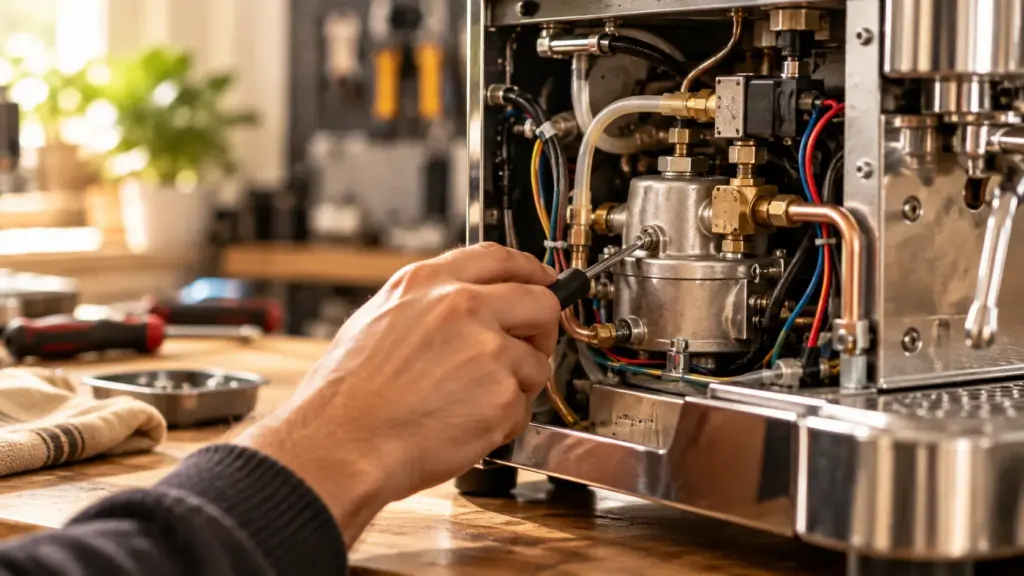
We repair and test
Once agreed, we complete the repair and carefully test your machine to make sure everything is working as it should.
05

We return it
We send you a personalised repair video, return your machine and include our 100-day repair warranty.
Why choose FMCM?
100-day warranty
Clear support after your repair.
99% repair success
A trusted repair route for machines worth keeping.
Sage specialists
Focused experience with the machines we know best.
4.9 Google rating
Independent feedback from customers who trusted us with their machine.
Ready to get your Oracle Touch working again?
Tell us what is happening and we will help you choose the right repair route.